
Due diligence from data room to decision material, with a source behind every finding.
Upload the data room and choose the depth of the review. The specialists each review their own area, the findings are weighed together into a risk picture and the decision material is written. Every finding in the report shows its source: a document in the data room, with the quote marked, or a public source with its link.

What DealTeam does in a due diligence.
The data room is read in
Upload files or a whole ZIP. The documents are classified automatically, and duplicates and missing document types show at once.
Three depths
Quick covers finance and legal. Standard covers all eight areas, with a risk picture and decision material. In Deep, each team’s specialists work first and the lead of the team sums up.
Source review of the parts that carry the report
The answers of the specialists responsible for finance, legal, the risk picture and the recommendation are checked against the sources by a separate review, corrected and reviewed again. It is a check made by AI, not an independent professional review.
A person decides what is uncertain
Findings with low confidence, quotes that are not found in the document, contradictions between the specialists and what a specialist has flagged itself are put in a review queue. There you decide, and an engagement cannot be closed with open points.
Ask about the review
Ask a question in the DD chat, and the specialist responsible for the section answers from the report and the data room, with a source. A change to the report is a proposal until you approve it, and then becomes a new version.
Request lists, Q&A and the process around the review
The engagement follows the transaction process from the first meeting to the agreement, in thirteen steps in three parts (Before the bid, Due diligence and Agreement), with request lists to the seller, Q&A and the findings register.
How a review works.
The data room is read in
The documents are read and classified, and completeness is measured against the document types a due diligence needs.
You choose the scope
Depth, language and what you want the specialists to go deeper on. The plan states who works and in what order.
The specialists review
The teams work in parallel, and you follow the progress while the review runs. The page has to stay open while it runs.
The material is written
The findings are weighed together into a recommendation with red flags, and the quotes are checked against the documents.
Finance, legal, commercial, technology, operations, HR, integration, and IR & communications.
Meet the specialistsEvery quote is looked up in the document it comes from.
A claim without a source is a guess. So every specialist is to give the source of a finding, and for a quote from the data room DealTeam checks that it stands in the document.
The specialist quotes word for word
The specialist is to support every finding and every red flag with a source: a word-for-word quote from a document in the data room, or the link to a public source.
DealTeam looks the quote up
The service itself searches the document’s text for the quote, without AI. If it is there, the finding is shown with its source and the place marked.
What cannot be checked is marked
A quote that is missing or cannot be found does not count as verified. A finding whose quote is not found is put in the review queue, where a person decides.
The check shows that the quote is in the document, not that the conclusion is right. That judgement is yours, with the source open beside it.
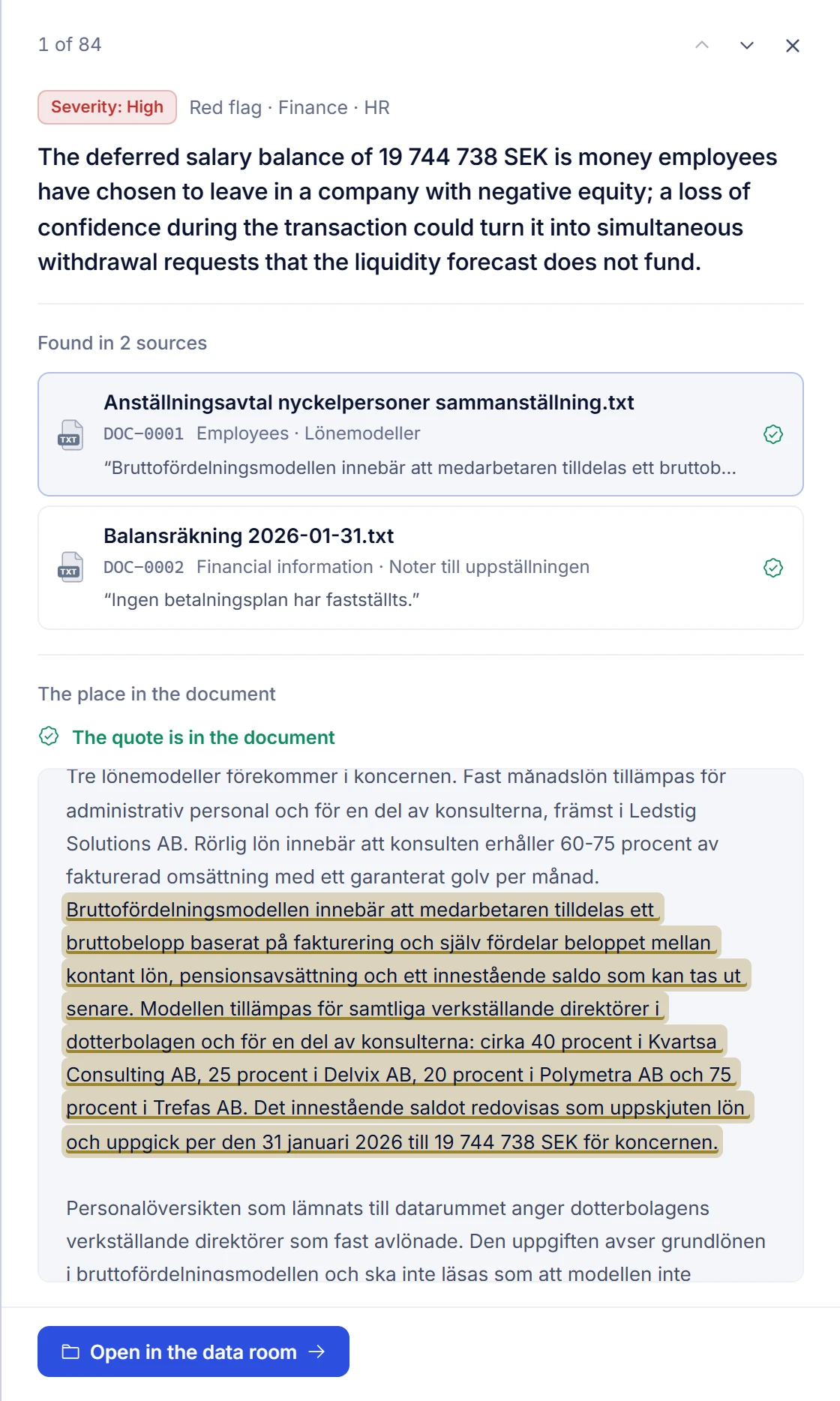
What the report contains.
A presentation and a written DD report
A presentation for the investment committee and a written DD report, in Swedish or English. Every run is saved as a version of its own, and the material can be exported as PowerPoint and Word.
Recommendation and red flags
A recommendation, and a risk picture in which the specialists’ findings are weighed together with severity and confidence, so that what matters most comes first.
A source with every finding
Every finding and every red flag is given with its source: a document in the data room with a word-for-word quote, marked in the document, or a public source with its link. A quote that is not found in the document is marked.
Open points, and what has not been read
The report sets out the open points and states which documents could not be read or have not been read in full.
Common questions about AI in due diligence
Which files can DealTeam read?
PDF, Word, Excel, SIE and text, as single files or a whole ZIP. Scanned pages without a text layer are not read: the document is saved and marked “No text”. The report states what has not been read.
What happens with a very large data room?
Every specialist reads the whole data room up to about 800,000 tokens, which corresponds to roughly 1.6 to 2.4 million characters of text, depending on how full of figures the material is. In a larger data room documents are shortened or left out, and the report states which have not been read in full.
How is a finding checked?
Every finding shows its source: a document in the data room, with the quote marked, or a public source with its link. What is uncertain is put in a review queue where a person decides.
Where is the material stored?
Documents, reports and accounts are stored within the EU, and the service runs on servers within the EU. The text of the documents is sent to the AI provider for analysis and is not used to train models. Security and data storage

See DealTeam on your own material.
A demo on example data, and after that a pilot on a real process.